 meepin
 Next Translate
2022 - 01 - 19 갱신
사용 라이브러리
next-i18n → next-translate 변경이유
기존의 Next.js 에서 사용하던 next-i18n의 경우 Next.js의 버전이 올라가면서 기본적으로 내장되도록 바뀜
next-translate 라이브러리에서 내부적으로 작동하는 기능들 덕분에 HOC 등 추가적인 설정 코드를 전부 삭제 가능했고 사용법도 간편해짐
변경사항
훅 사용시 본인이 사용하는 언어셋의 json 파일을 스트링으로 입력해줘야함 안할경우 에러
[next-translate] "selectLanguage" has no namespace in front of it.

app.tsx에서 사용해주던 appWithTranslation 삭제

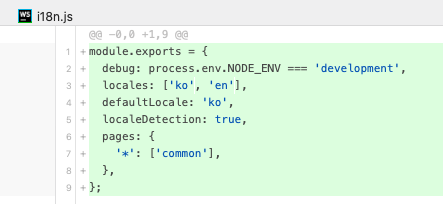
페이지마다 언어 설정을 추가하는 방법이 매우 쉬워짐
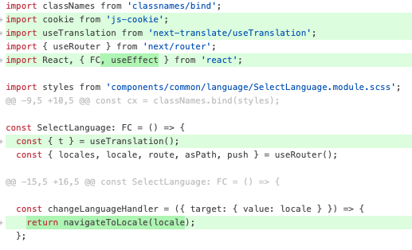
→ locale 정보로 라우팅 기능을 만들 필요없이 next-translate/setLanguage를 import 하여 바로 라우팅 가능

Link Switching
import Link from 'next/link' export default function IndexPage(props) { return ( <Link href="/another" locale="fr"> <a>To /fr/another</a> </Link> ) }
Push Switching
import { useRouter } from 'next/router' export default function IndexPage(props) { const router = useRouter() return ( <div onClick={() => { router.push('/another', '/another', { locale: 'fr' }) }} > to /fr/another </div> ) }
How to save the user-defined language
const { defaultLocale } = useRouter(); const persistLocaleCookie = () => { if (locale !== defaultLocale) { const date = new Date(); const expireMs = 100 * 24 * 60 * 60 * 1000; date.setTime(date.getTime() + expireMs); document.cookie = NEXT_LOCALE=${locale};expires=${date.toUTCString()};path=/; } }; useEffect(persistLocaleCookie, [locale, defaultLocale]);
This code snippet creates a function called "persistLocaleCookie" that is used to set a cookie on the user's browser.
The function first checks if the current "locale" variable is different from the default "defaultLocale" variable.
If it is, it proceeds to set a cookie called "NEXT_LOCALE" with the value of the current "locale" variable.
The expiration date of the cookie is set by creating a new Date object, and then adding the number of milliseconds in 100 days to the current time. This creates a date that is 100 days in the future, which is when the cookie will expire.
The cookie is then set with the "document.cookie" property, which takes a string that is in the format of "name=value; expires=date; path=path". In this case, the "name" is "NEXT_LOCALE", "value" is the current "locale" variable and "date" is the UTC formatted date when the cookie will expire. The "path" is set to "/" which means that the cookie will be available on all pages of the website.
This function is likely used to persist the user's selected language across different pages of the website. When the user changes the language, this function gets called and the cookie gets set, so that the next time user visit the website, the website would know which language the user prefers.
another destination to save your namespaces files usingloadLocaleFromconfiguration property:
{ // ...rest of config "loadLocaleFrom": (lang, ns) => // You can use a dynamic import, fetch, whatever. You should // return a Promise with the JSON file. import(./myTranslationsFiles/${lang}/${ns}.json).then((m) => m.default), }
→ERROR
const nextTranslate = require('next-translate'); const withBundleAnalyzer = require('@next/bundle-analyzer')({ enabled: process.env.ANALYZE === 'true', }); const CompressionPlugin = require('compression-webpack-plugin'); const nextConfig = { reactStrictMode: false, sassOptions: { prependData: @import "styles/_variables.scss"; @import "styles/_mixins.scss";, // prependData 옵션 추가 }, plugins: [ new CompressionPlugin({ algorithm: 'gzip', test: /\.js$/, }), ], images: { domains: ['rickandmortyapi.com'], }, }; module.exports = (phase, defaultConfig) => { return withBundleAnalyzer( nextTranslate({ defaultConfig, ...nextConfig, }), ); };
→ yarn dev
warn - Invalid next.config.js options detected: - The root value has an unexpected property, defaultConfig, which is not in the list of allowed properties (amp, analyticsId, assetPrefix, basePath, cleanDistDir, compiler, compress, crossOrigin, devIndicators, distDir, env, eslint, excludeDefaultMomentLocales, experimental, exportPathMap, future, generateBuildId, generateEtags, headers, httpAgentOptions, i18n, images, onDemandEntries, optimizeFonts, output, outputFileTracing, pageExtensions, poweredByHeader, productionBrowserSourceMaps, publicRuntimeConfig, reactStrictMode, redirects, rewrites, sassOptions, serverRuntimeConfig, staticPageGenerationTimeout, swcMinify, trailingSlash, typescript, useFileSystemPublicRoutes, webpack). - The root value has an unexpected property, plugins, which is not in the list of allowed properties (amp, analyticsId, assetPrefix, basePath, cleanDistDir, compiler, compress, crossOrigin, devIndicators, distDir, env, eslint, excludeDefaultMomentLocales, experimental, exportPathMap, future, generateBuildId, generateEtags, headers, httpAgentOptions, i18n, images, onDemandEntries, optimizeFonts, output, outputFileTracing, pageExtensions, poweredByHeader, productionBrowserSourceMaps, publicRuntimeConfig, reactStrictMode, redirects, rewrites, sassOptions, serverRuntimeConfig, staticPageGenerationTimeout, swcMinify, trailingSlash, typescript, useFileSystemPublicRoutes, webpack)
This warning is indicating that thedefaultConfigandpluginsproperties are not allowed options in thenext.config.jsfile.
These properties are not part of the Next.js framework and may cause unexpected behavior.
The recommended solution is to remove these properties from the config file and use the appropriate options provided by Next.js.
Additionally, you should check the documentation of thenext-translateand@next/bundle-analyzerpackages to see if they have any specific configuration options that should be used instead of thedefaultConfigandpluginsproperties.
You can remove thedefaultConfigproperty from thenextTranslatefunction and pass in thenextConfigobject directly.
Thepluginsproperty should also be removed as it is not a valid option for Next.js.
Instead of using theCompressionPluginyou can use thecompressoption innextConfiglike this:
→SOLVE
const nextTranslate = require('next-translate'); const withBundleAnalyzer = require('@next/bundle-analyzer')({ enabled: process.env.ANALYZE === 'true', }); const nextConfig = { reactStrictMode: false, sassOptions: { prependData: @import "styles/_variables.scss"; @import "styles/_mixins.scss";, }, compress: true, images: { domains: ['rickandmortyapi.com'], }, }; module.exports = () => { return withBundleAnalyzer( nextTranslate({ ...nextConfig, }), ); };
2023 - 01 - 19 이전 방식 ( 읽지 않아도 무방함 )
사용 라이브러리
Next.js에서의 사용법
샘플 레포 -https://git.hnine.com/minu.ha/Front/
TODO //
접속국가 플래그의 경우 라이브러리를 사용하여 사용자의 접속 국가를 알아내는 방식이 있음
브라우저의 언어셋을 탐지하는 방식과 접속 국가를 탐지하여 언어셋을 적용하는 방법이 각각 존재함
- 번역되는 방식
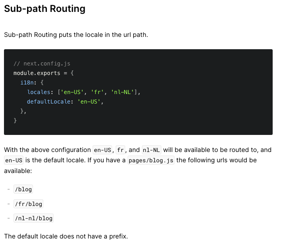
도메인 주소 뒤에 / 로 붙는 서브 패스 라우팅 방식
일반적으로 사이트의 볼륨이 거대하지 않은 경우 도메인을 바꾸는 방식을 많이 사용하지 않음
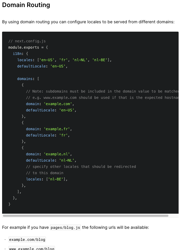
도메인 라우팅 방식
서브패스 라우팅과는 다르게 도메인 자체를 바꿔버리는 방식
미리 언어셋에 따른 도메인을 설정해둔 뒤 사용자가 진입했을 때 변경되는 도메인을 나타내줌
기본적인 사용법
// next-i18next.config.js // 설정파일 - 프로젝트 루트 module.exports = { debug: process.env.NODE_ENV === 'development', i18n: { // 지원 언어 locales: ['en', 'ko'], // 지원하지 않는 언어로 진입시 초기 세팅언어 defaultLocale: 'en', // 자주 사용하는 언어 탐지 후 페이지 진입시 자동 탐지 localeDetection: true, }, };
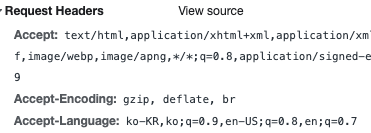
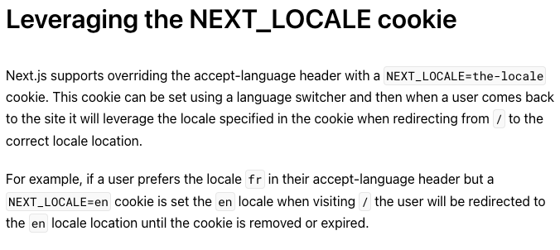
localeDetection의 경우 페이지 진입시 request-header에
Accept-Language가 들어오고 이 값에 따라 언어를 세팅해줌
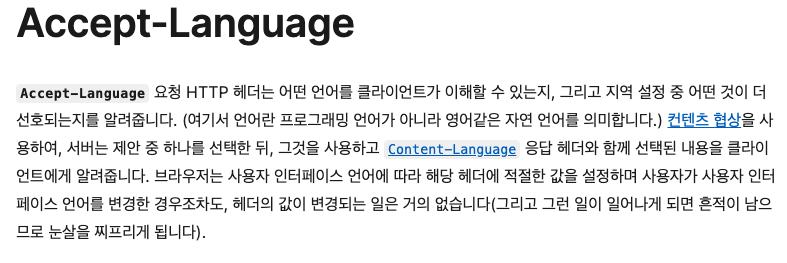
When a user visits the application root (generally/), Next.js will try to automatically detect which locale the user prefers based on theAccept-Languageheader and the current domain.
If a locale other than the default locale is detected, the user will be redirected to either:
When using Sub-path Routing:The locale prefixed path
When using Domain Routing:The domain with that locale specified as the default
When using Domain Routing, if a user with theAccept-Languageheaderfr;q=0.9visitsexample.com, they will be redirected toexample.frsince that domain handles thefrlocale by default.
When using Sub-path Routing, the user would be redirected to/fr.
/** @type {import('next').NextConfig} */ // next.config.js에 i18n 추가 const path = require('path'); + const { i18n } = require('./next-i18next.config'); const withBundleAnalyzer = require('@next/bundle-analyzer')({ enabled: process.env.ANALYZE === 'true', }); const nextConfig = { reactStrictMode: true, sassOptions: { includePaths: [path.join(__dirname, 'styles')], prependData: @import "styles/_variables.scss"; @import "styles/_mixins.scss";, // prependData 옵션 추가 }, + i18n, }; module.exports = (phase, defaultConfig) => { return withBundleAnalyzer({ defaultConfig, ...nextConfig, }); };
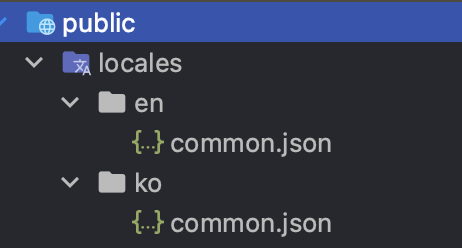
퍼블릭 폴더에 지원하는 언어 폴더 세팅시 i18n이 자동으로 탐지함

번역하고자 하는 페이지에 getStaticProps로 번역파일들 빌드타임에 주입하여 페이지를 생성해두는방식
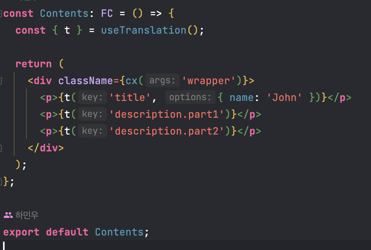
useTranslation 훅으로 locales에 있는 데이터 사용
t로 텍스트를 감싸게되면 세팅된 언어대로 출력됨
- 언어 스위칭
next의 useRouter 훅을 사용해서 언어 정보들을 가져올 수 있고 사용자가 언어셋을 변경하는 핸들러를 만들 수 있음
import classNames from 'classnames/bind'; import { useTranslation } from 'next-i18next'; import { useRouter } from 'next/router'; import React, { FC } from 'react'; import styles from './SelectLanguage.module.scss'; const cx = classNames.bind(styles); const SelectLanguage: FC = () => { const { t, i18n } = useTranslation(); const { locales, locale, route, asPath, push } = useRouter(); const navigateToLocale = (locale) => push(route, asPath, { locale }); const changeLanguageHandler = ({ target: { value: locale } }) => { i18n.changeLanguage(locale).then(() => navigateToLocale(locale)); }; return ( <div className={cx('select-wrapper')}> <p>{t('selectLanguage')}:</p> <select value={locale} onChange={changeLanguageHandler}> {locales?.map((locale) => ( <option key={`locale-${locale}`} value={locale}> {locale} </option> ))} </select> </div> ); }; export default SelectLanguage;
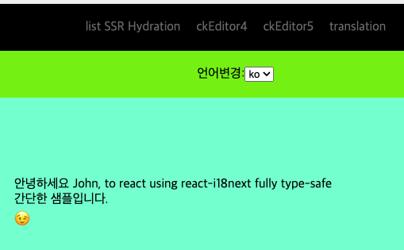
샘플 페이지 1.http://localhost:3000/ko/translation
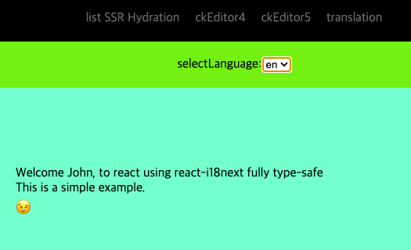
accept-language에 ko-kr이 들어오기 때문에 페이지 진입시 도메인 뒤에 /ko가 붙는 페이지로 진입함